Local PDF verification for AI coding agents
KDP rejected my PDF.
Find the problem before you upload again.
You export a finished interior or cover PDF and upload it to Amazon KDP or IngramSpark. An automated check rejects the file with an ambiguous error message.
AuthorKit Preflight inspects your PDF locally before submission. It reports pass, warning or failure for geometry, spine width, font embedding and margins, paired with the exact technical fix.
Get it on Agensi, $9One-time purchase. Agensi handles payment and the money-back guarantee.
Who this skill is for
AuthorKit Preflight is an agent skill for authors working with an AI coding agent such as Claude Code. It requires Python 3.9 or later, the pypdf library, and an active AI agent. Installing Poppler adds deep font, image and margin checks. It runs directly in your local terminal session. It is not a generic web converter or push-button service for non-technical authors. Authors without a local AI coding setup should use our free web checklist instead.
Common upload errors caught before submission
Amazon KDP and IngramSpark enforce strict mechanical rules on PDF files. Small export mistakes stop your book during automated file intake.
Unembedded fonts. PDF readers display local system fonts on your screen even when the typeface is not embedded in the file. Print machinery requires embedded fonts to rasterize glyphs accurately on physical paper.
Spine width mismatch. Paperback spine thickness depends on page count and paper thickness. An incorrect spine measurement shifts your cover artwork and causes cover rejection.
Margin and safe area errors. KDP requires minimum margins based on total page count. Page numbers or body text placed inside the live element margin boundary get flagged immediately.
Image resolution drops. Raster artwork below 300 DPI prints blurry and triggers automated quality warnings.
Plain-text sample report
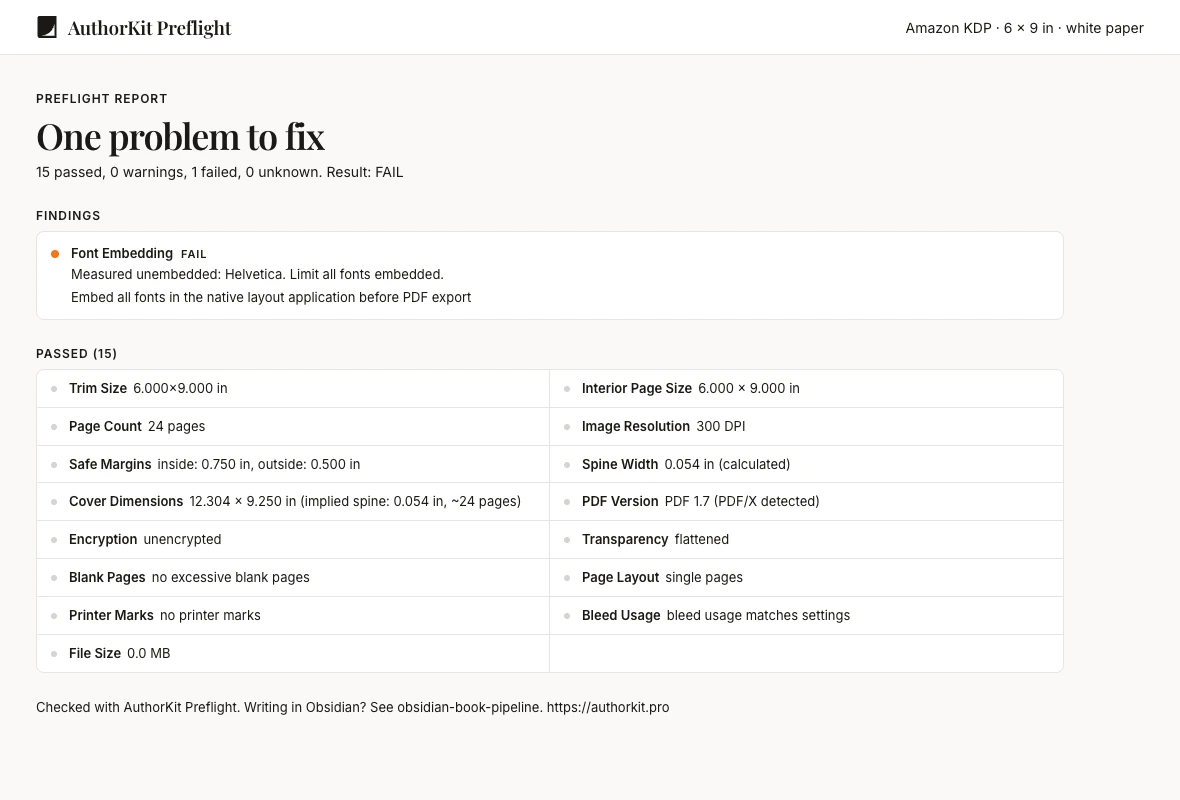
The skill runs on your computer and writes a Markdown report. Here is the actual output from the failing test interior included with the skill:
# AuthorKit Preflight Report

**Summary:** 15 passed, 0 warnings, 1 failed, 0 unknown. Result: FAIL

| Check | Status | Measured | Limit | Fix |
| :--- | :--- | :--- | :--- | :--- |
| Trim Size | pass | 6.000x9.000 in | standard trim size | None |
| Interior Page Size | pass | 6.000 x 9.000 in | 6.000 x 9.000 in | None |
| Page Count | pass | 24 pages | 24 to 828 pages | None |
| Font Embedding | fail | unembedded: Helvetica | all fonts embedded | Embed all fonts in the native layout application before PDF export |
| Image Resolution | pass | 300 DPI | >= 300 DPI | None |
| Safe Margins | pass | inside: 0.750 in, outside: 0.500 in | inside >= 0.375 in, outside >= 0.250 in | None |
| Spine Width | pass | 0.054 in (calculated) | 0.054 in | None |
| Cover Dimensions | pass | 12.304 x 9.250 in | 12.304 x 9.250 in | None |
| PDF Version | pass | PDF 1.7 (PDF/X detected) | PDF/X-1a preferred | None |
| Encryption | pass | unencrypted | unencrypted | None |
| Transparency | pass | flattened | flattened | None |
| Blank Pages | pass | no excessive blank pages | body <= 4, end <= 10 | None |
| Page Layout | pass | single pages | single page layout | None |
| Printer Marks | pass | no printer marks | no printer marks | None |
| Bleed Usage | pass | bleed usage matches settings | consistent bleed usage | None |
| File Size | pass | 0.0 MB | <= 650 MB | None |
What it is honest about
When the tool cannot verify a detail, it reports unknown. It never reports a speculative pass. The IngramSpark spine width calculation is an estimate unless you provide the exact number from IngramSpark's template generator. Some limits come from files print facilities accepted in practice rather than published documentation. The checks were developed against accepted files from two published book editions. A passing report does not guarantee that a printer will accept your file.
How you use it
Preflight runs as a skill in your AI agent conversation. You supply the local path to your exported PDF, the printer name, trim dimensions and paper stock. The script inspects the file on your machine and outputs the table above. It makes no remote network calls. Your manuscript never leaves your hard drive.
Free companion tools
AuthorKit provides free standalone web tools for self-publishing authors on AuthorKit Resources.
Calculate cover wrap dimensions, spine width and Canva pixel sizes with the KDP cover calculator.
Walk through physical submission specifications using the KDP paperback preflight checklist.
Check printing costs and estimated net earnings across markets with the KDP royalty calculator.
Generate compliant copyright notices and disclaimer statements with the copyright page generator.
Read registration steps for Indian editions in the free ISBN application guide for India.
If you write in Obsidian
The AuthorKit pipeline builds the print-ready PDF from your vault and stays free and open source under the MIT licence. Preflight is a separate skill that checks the file the pipeline or any other tool produces. It is sold through Agensi under a personal purchase licence.